

OS Stratis 파일시스템에 대해 들어보셨나요?
페이지 정보
작성자 OSworker 아이디로 검색 전체게시물 댓글 0건 조회 2,000회 좋아요 1회 작성일 23-09-25 00:02본문
안녕하세요
Stratis 파일시스템에 대해 들어보셨나요?
Stratis는 Linux용 로컬 스토리지 관리 솔루션입니다.
단순성과 사용 편의성에 중점을 두고 고급 스토리지 기능에 액세스할 수 있습니다.
Stratis는 고급 스토리지 기능을 지원하는 하이브리드 사용자 및 커널 로컬 스토리지 관리 시스템입니다. Stratis의 주요 개념은 스토리지 풀 입니다. 이 풀은 하나 이상의 로컬 디스크 또는 파티션에서 생성되며 풀에서 볼륨이 생성됩니다.
이 풀을 사용하면 다음과 같은 다양한 유용한 기능을 사용할 수 있습니다.
- 파일 시스템 스냅샷
- 씬 프로비저닝
- 계층화
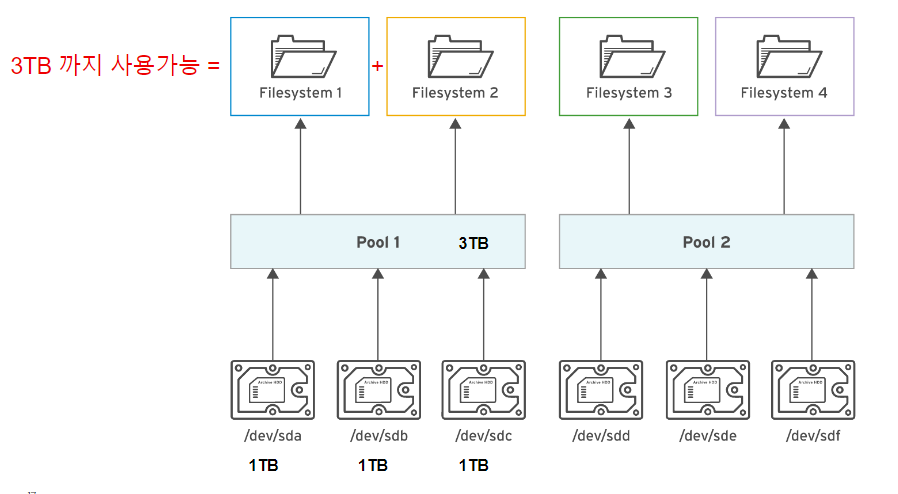
stratis-cli는 CLI툴이고, stratisd가 CLI를 통한 요청을 처리하는 데몬입니다.
[root@rhel9]# yum install stratisd stratis-cli
Updating Subscription Management repositories.
Last metadata expiration check: 4:20:04 ago on Mon 20 Feb 2023 06:48:57 PM KST.
Dependencies resolved.
==================================================================================
Package Architecture Version Repository Size
==================================================================================
Installing:
stratis-cli noarch 3.2.0-1.el9 rhel-9-for-x86_64-appstream-rpms 122 k
stratisd x86_64 3.2.2-1.el9 rhel-9-for-x86_64-appstream-rpms 3.2 M
Installing dependencies:
python3-dbus-client-gen noarch 0.5-5.el9 rhel-9-for-x86_64-appstream-rpms 32 k
python3-dbus-python-client-gen noarch 0.8-5.el9 rhel-9-for-x86_64-appstream-rpms 33 k
python3-dbus-signature-pyparsing noarch 0.04-5.el9 rhel-9-for-x86_64-appstream-rpms 25 k
python3-into-dbus-python noarch 0.08-5.el9 rhel-9-for-x86_64-appstream-rpms 35 k
python3-justbases noarch 0.15-6.el9 rhel-9-for-x86_64-appstream-rpms 54 k
python3-justbytes noarch 0.15-6.el9 rhel-9-for-x86_64-appstream-rpms 52 k
python3-packaging noarch 20.9-5.el9 rhel-9-for-x86_64-appstream-rpms 81 k
python3-pyparsing noarch 2.4.7-9.el9 rhel-9-for-x86_64-baseos-rpms 154 k
python3-wcwidth noarch 0.2.5-8.el9 rhel-9-for-x86_64-appstream-rpms 48 k
Transaction Summary
===================================================================================
Install 11 Packages
Total download size: 3.9 M
Installed size: 16 M
Is this ok [y/N]:
2. Stratis 기동
[root@rhel9 ~]# systemctl enable stratisd
[root@rhel9 ~]# systemctl start stratisd
[root@rhel9 ~]# systemctl status stratisd
● stratisd.service - Stratis daemon
Loaded: loaded (/usr/lib/systemd/system/stratisd.service; enabled; vendor preset: enabled)
Active: active (running) since Mon 2023-02-20 23:10:50 KST; 14s ago
Docs: man:stratisd(8)
Main PID: 3562 (stratisd)
Tasks: 8 (limit: 24625)
Memory: 1.7M
CPU: 15ms
CGroup: /system.slice/stratisd.service
└─3562 /usr/libexec/stratisd --log-level debug
Feb 20 23:10:50 rhel9 systemd[1]: Starting Stratis daemon...
Feb 20 23:10:50 rhel9 stratisd[3562]: [2023-02-20T14:10:50Z INFO stratisd::stratis::run] stratis daemon version 3.2.2 started
Feb 20 23:10:50 rhel9 stratisd[3562]: [2023-02-20T14:10:50Z INFO stratisd::stratis::run] Using StratEngine
Feb 20 23:10:50 rhel9 stratisd[3562]: [2023-02-20T14:10:50Z INFO stratisd::engine::strat_engine::liminal::identify] Beginning initial search for Stratis block devices
Feb 20 23:10:50 rhel9 stratisd[3562]: [2023-02-20T14:10:50Z INFO stratisd::stratis::ipc_support::dbus_support] D-Bus API is available
Feb 20 23:10:50 rhel9 systemd[1]: Started Stratis daemon.
3.Pool 생성, File system 생성
[root@rhel9 ~]# stratis pool create pool01 /dev/vda
[root@rhel9 ~]# stratis pool create pool02 /dev/vdb
[root@rhel9 ~]# lsblk
NAME MAJ:MIN RM SIZE RO TYPE MOUNTPOINTS
……
….. 생략
vda 252:0 0 10G 0 disk
└─stratis-1-private-5d4ec595a51f47939588cfefbf33e49c-physical-originsub 253:2 0 10G 0 stratis
├─stratis-1-private-5d4ec595a51f47939588cfefbf33e49c-flex-thinmeta 253:3 0 712K 0 stratis
│ └─stratis-1-private-5d4ec595a51f47939588cfefbf33e49c-thinpool-pool 253:6 0 9.5G 0 stratis
├─stratis-1-private-5d4ec595a51f47939588cfefbf33e49c-flex-thindata 253:4 0 9.5G 0 stratis
│ └─stratis-1-private-5d4ec595a51f47939588cfefbf33e49c-thinpool-pool 253:6 0 9.5G 0 stratis
└─stratis-1-private-5d4ec595a51f47939588cfefbf33e49c-flex-mdv 253:5 0 512M 0 stratis
vdb 252:16 0 10G 0 disk
└─stratis-1-private-1f2c87c154634403b224be0d3b15bc04-physical-originsub 253:7 0 10G 0 stratis
├─stratis-1-private-1f2c87c154634403b224be0d3b15bc04-flex-thinmeta 253:8 0 712K 0 stratis
│ └─stratis-1-private-1f2c87c154634403b224be0d3b15bc04-thinpool-pool 253:11 0 9.5G 0 stratis
├─stratis-1-private-1f2c87c154634403b224be0d3b15bc04-flex-thindata 253:9 0 9.5G 0 stratis
│ └─stratis-1-private-1f2c87c154634403b224be0d3b15bc04-thinpool-pool 253:11 0 9.5G 0 stratis
└─stratis-1-private-1f2c87c154634403b224be0d3b15bc04-flex-mdv 253:10 0 512M 0 stratis
[root@rhel9 ~]#
> Pool List 확인
[root@rhel9 ~]# stratis pool list
Name Total / Used / Free Properties UUID Alerts
pool01 10 GiB / 517.39 MiB / 9.49 GiB ~Ca,~Cr, Op 5d4ec595-a51f-4793-9588-cfefbf33e49c WS001
pool02 10 GiB / 517.39 MiB / 9.49 GiB ~Ca,~Cr, Op 1f2c87c1-5463-4403-b224-be0d3b15bc04 WS001
-------------------------------------
> pool 생성 오류 시
$ stratis pool create pool1 /dev/sdb /dev/sdc
Execution failed:
stratisd failed to perform the operation that you requested. It returned the following information via the D-Bus: ERROR: Engine error: At least one of the devices specified was unsuitable for initialization: Engine error: udev information indicates that device /dev/sdb is a block device which appears to be owned.
# 파일시스템 signature를 지워줍니다.
$ wipefs -a /dev/sdb
/dev/sdb: 8 bytes were erased at offset 0x00000200 (gpt): 45 46 49 20 50 41 52 54
/dev/sdb: 8 bytes were erased at offset 0x77ffffe00 (gpt): 45 46 49 20 50 41 52 54
/dev/sdb: 2 bytes were erased at offset 0x000001fe (PMBR): 55 aa
/dev/sdb: calling ioctl to re-read partition table: Success
$ wipefs -a /dev/sdc
-------------------------------------
Stratis 파일 시스템 생성 및 확인
[root@rhel9 ~]# stratis filesystem create pool01 fs01
[root@rhel9 ~]# stratis filesystem create pool02 fs02
[root@rhel9 ~]# stratis filesystem list
Pool Filesystem Total / Used / Free Created Device UUID
pool01 fs01 1 TiB / 546 MiB / 1023.47 GiB Feb 20 2023 23:18 /dev/stratis/pool01/fs01 3e468ce7-e2ae-45d0-b13e-68309e650b31
pool02 fs02 1 TiB / 546 MiB / 1023.47 GiB Feb 20 2023 23:18 /dev/stratis/pool02/fs02 3bacf709-18c6-4aeb-9c04-02d184ace12c
[root@rhel9 ~]#
> Stratis 파일 시스템 마운트
[root@rhel9 ~]# df -hP
Filesystem Size Used Avail Use% Mounted on
/dev/mapper/stratis-1-5d4ec595a51f47939588cfefbf33e49c-thin-fs-e0b54a6db635466cb9b58ad7bcfb7e2c 1.0T 7.2G 1017G 1% /fs01
/dev/mapper/stratis-1-1f2c87c154634403b224be0d3b15bc04-thin-fs-3bacf70918c64aeb9c0402d184ace12c 1.0T 7.2G 1017G 1% /fs02
OR
[root@rhel9 /]# vi /etc/fstab
UUID=e0b54a6db635466cb9b58ad7bcfb7e2c /fs01 xfs defaults,x-systemd.requires=stratisd.service 0 0
UUID=3bacf709-18c6-4aeb-9c04-02d184ace12c /fs02 xfs defaults,x-systemd.requires=stratisd.service 0 0
Stratis 파일 시스템에서 스냅샷 사용
[root@rhel9 fs01]# touch test{0..9}.txt
[root@rhel9 fs01]# ll
total 0
-rw-r--r-- 1 root root 0 Feb 23 14:41 test0.txt
-rw-r--r-- 1 root root 0 Feb 23 14:41 test1.txt
-rw-r--r-- 1 root root 0 Feb 23 14:41 test2.txt
-rw-r--r-- 1 root root 0 Feb 23 14:41 test3.txt
-rw-r--r-- 1 root root 0 Feb 23 14:41 test4.txt
-rw-r--r-- 1 root root 0 Feb 23 14:41 test5.txt
-rw-r--r-- 1 root root 0 Feb 23 14:41 test6.txt
-rw-r--r-- 1 root root 0 Feb 23 14:41 test7.txt
-rw-r--r-- 1 root root 0 Feb 23 14:41 test8.txt
-rw-r--r-- 1 root root 0 Feb 23 14:41 test9.txt
[root@rhel9 fs01]# stratis fs snapshot pool01 fs01 pool01_fs01_0223_snapshot
[root@rhel9 fs01]# stratis fs list
Pool Filesystem Total / Used / Free Created Device UUID
pool01 fs01 1 TiB / 546 MiB / 1023.47 GiB Feb 23 2023 14:01 /dev/stratis/pool01/fs01 e0b54a6d-b635-466c-b9b5-8ad7bcfb7e2c
pool01 pool01_fs01_0223_snapshot 1 TiB / 546 MiB / 1023.47 GiB Feb 23 2023 14:43 /dev/stratis/pool01/pool01_fs01_0223_snapshot 62e8a1eb-6d60-4b22-9eb8-756a3332d2fd
pool02 fs02 1 TiB / 546 MiB / 1023.47 GiB Feb 20 2023 23:18 /dev/stratis/pool02/fs02 3bacf709-18c6-4aeb-9c04-02d184ace12c
> Stratis 파일 시스템에서 스냅샷 사용 테스트
[root@rhel9 fs01]# rm -rf test{5..9}.txt <----파일을 지워봅니다.
[root@rhel9 fs01]# ls
test0.txt test1.txt test2.txt test3.txt test4.txt <----- 5번에서9번 파일이 없음
[root@rhel9 fs01]# mount /dev/stratis/pool01/pool01_fs01_0223_snapshot <------ 스냅샷 파일시스템 활성화(마운트)
[root@rhel9 fs01]# mkdir /snampshot <------ 임시 마운트할 디렉토리 생성
[root@rhel9 fs01]# mount /dev/stratis/pool01/pool01_fs01_0223_snapshot /snampshot <--- 마운트 하기
[root@rhel9 fs01]# df -h
Filesystem Size Used Avail Use% Mounted on
………………
…………
/dev/mapper/stratis-1-5d4ec595a51f47939588cfefbf33e49c-thin-fs-e0b54a6db635466cb9b58ad7bcfb7e2c 1.0T 7.2G 1017G 1% /fs01
/dev/mapper/stratis-1-1f2c87c154634403b224be0d3b15bc04-thin-fs-3bacf70918c64aeb9c0402d184ace12c 1.0T 7.2G 1017G 1% /fs02
/dev/mapper/stratis-1-5d4ec595a51f47939588cfefbf33e49c-thin-fs-62e8a1eb6d604b229eb8756a3332d2fd 1.0T 7.2G 1017G 1% /snapshot
[root@rhel9 fs01]# ls /snapshot/ <------5 ~ 9번까지의 파일이 있는것을 확인
test0.txt test1.txt test2.txt test3.txt test4.txt test5.txt test6.txt test7.txt test8.txt test9.txt
댓글목록
등록된 댓글이 없습니다.

 Top